在网页中使用Service Worker发送通知
最近写了一个上班时摸鱼用的舰C远征计时工具。React的部分很快就搞定了,但是因为远征结束的时候要发送一个浏览器通知,我以前没有写过这种东西,所以走了很多弯路花了不少时间,最终还是把功能实现了。
这是我第一次使用Service Worker,也没有花很多时间去研究,所以肯定会有很多疏漏。
最简单的通知
单纯发送通知其实是很简单的,只要new一个Notification就可以了。注意要先用Notification.requestPermission()申请通知权限。
new Notification("Hi there!");与通知交互
事情到这里进行得还算比较顺利,问题出现在我想要在通知中加入一个重启计时器的按钮,这样我就不用点开计时器的标签了。类似这样的
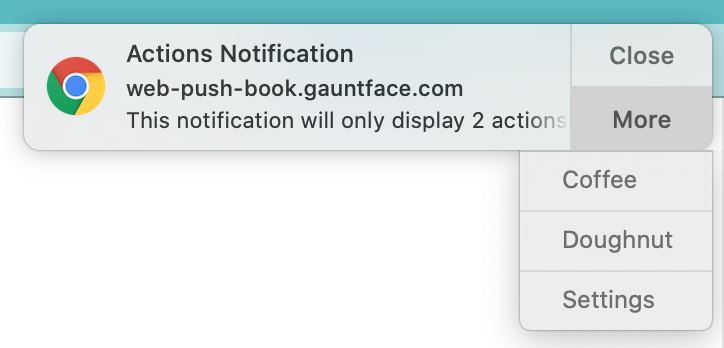
这种按钮在Notification中称为Action。在Notification构造函数中有一个Actions数组,其成员是NotificationAction,这里面就可以添加你想要的Action了。既然可以添加Action,那么按照JavaScript的惯例,肯定有个地方要添加相应的callback了。对于Notification的Action来说,callback是定义在Service Worker中的。
Notification中的Action不能直接定义在前面那样的构造函数中,而必须通过ServiceWorkerRegistration.showNotification()来定义。
// 这里使用了React的props变量
this.props.serviceWorkerRegistration.showNotification(
  `远征「${this.props.missionInfo[this.state.missionId].name}」结束`,
  {
    body: this.getFleetName(this.props.fleetId),
    renotify: true,
    requireInteraction: true,
    tag: this.fleetId,
    actions: [
      {
        action: "restart-timer",
        title: "Restart"
      }
    ]
  }
);
Service Worker (SW)
A service worker is a script that your browser runs in the background, separate from a web page, opening the door to features that don’t need a web page or user interaction.
我的理解是Service Worker是浏览器替网站执行的本地后台进程,前台网页可以把一些background任务交给service worker让它在后台运行,更重要的是,service worker还具有离线运行的能力。
关于service worker的life cycle之类的可以去看前面的Google的文档。
Registration
Service worker是一个单独的js文件,需要前台网页来register。我用了register-service-worker这个库来简化这个流程。
import { register } from "register-service-worker";
const registration = await new Promise((resolve, reject) => {
  register("./service_worker.js", {
    registrationOptions: { scope: "./" }, // 这里的scope要注意,一定要包含你要控制的页面路径
    ready(registration: ServiceWorkerRegistration) {
      console.log("Service worker is active.");
      resolve(registration);
    },
    error(error) {
      reject("Error during service worker registration:" + error);
    }
  });
});
与Service Worker通信
我一开始看到的例子是使用MessageChannel来进行通信,注册SW之后直接通知SW使用全局变量保存channel的信息。问题出在SW在一段时间后(几分钟or几十秒)会被浏览器stop,在有事件的时候会再次唤醒。全局变量会被清除,SW也不能用local storage。
所以要么你在每次show notification之后都重新通知一次SW channel信息,要么使用广播模式。我选择了广播模式
self.addEventListener("notificationclick", (event: any) => {
  event.notification.close();
  // 这里的action与之前注册时的action对应
  if (event.action === "restart-timer") {
    // Restart the timer
    const fleetId = event.notification.tag;
    const channel = new BroadcastChannel("kancolle_mission_timer");
    channel.postMessage({
      restart: true,
      fleetId
    });
  }
}, false);
评论